SCM Active Directory dashboard
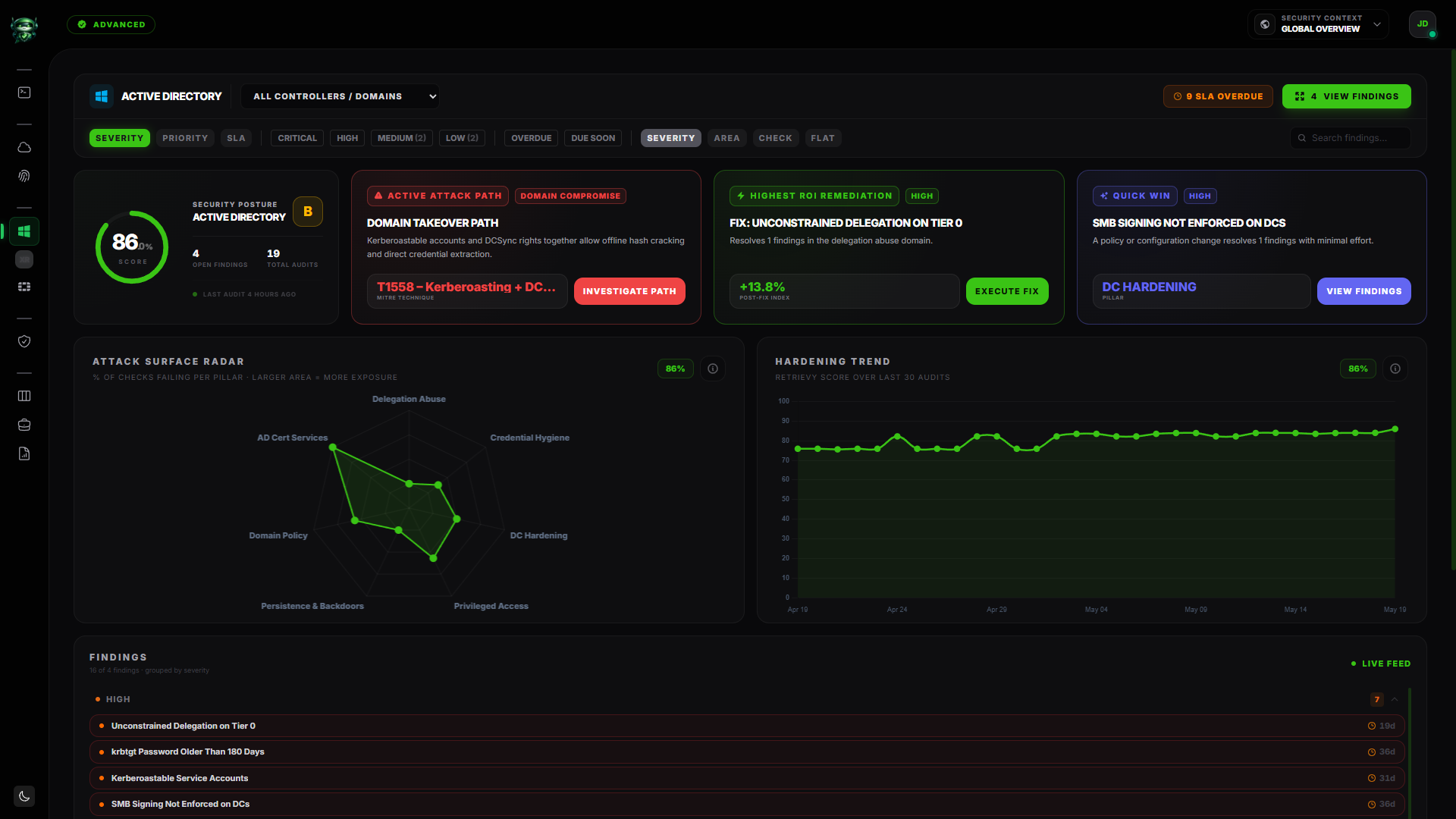
The SCM Active Directory dashboard is the per-domain view of your on-prem identity infrastructure. It pulls in everything the Retrievy Agent on Windows ships from your domain controllers: CIS Windows hardening checks, AD-specific risk checks (Kerberoastable accounts, AS-REP roasting, LAPS coverage, deep group nesting, weak SMB signing), plus the GPO X-Ray analysis surfaced through a dedicated sub-page.
The page header reads Active Directory. It lives under SCM in the navigation. The page is available on plans that include the SCM module (see plan feature matrix).
Before you start
- The Retrievy Agent on Windows installed on a domain controller, Online, with at least one completed scan.
- Permission to read AD findings. In Settings → Roles & Permissions, your role needs either the View all Active Directory findings toggle or its scoped counterpart, under the Active Directory group. Without one of these the AD nav entry under SCM is hidden.
If the agent isn't installed yet, the dashboard shows the empty state described below with a pointer to the install guide.
What you'll see
Same skeleton as the CSPM and ISPM dashboards, with AD-specific differences:
- Header strip with the Domain / Controller dropdown (defaults to All Controllers / Domains) and a per-domain account picker.
- Per-module score hero. Percentage gauge with letter grade (A through F), Checked and Passed tiles, Last audit <time> ago footer.
- Top KPI strip. Checked, Passed, Open Findings, Total Audits.
- Attack Surface Radar. A 7-axis radar (described below).
- Findings feed at the bottom with the standard toolbar (sort, severity chips, SLA chips, group-by, search, clear).
- Policy Hygiene Observations panel near the bottom, with a link to the GPO X-Ray.
Attack Surface Radar (7 AD pillars)
This is what makes the AD dashboard distinct. The radar plots seven Active Directory attack-surface pillars:
| Pillar | What it covers |
|---|---|
| Delegation Abuse | Constrained / unconstrained delegation paths attackers exploit. |
| Credential Hygiene | Reversible passwords, password-never-expires admins, weak service accounts. |
| DC Hardening | Domain controller config: SMB signing, NTLMv1, LDAP signing, secure-channel settings. |
| Privileged Access | Tier-0 access exposure, AdminSDHolder issues, nested admin sprawl. |
| Persistence & Backdoors | Suspicious schema changes, AdminSDHolder ACL drift, planted accounts. |
| Domain Policy | Domain-level security policy gaps (password policy, account lockout, audit policy). |
| AD Cert Services | ADCS misconfigurations attackers use for forged-certificate authentication. |
The radar tooltip on each axis reads % of checks failing per pillar. The larger the area on the radar, the more concentrated your AD risk is in those pillars.
This taxonomy doesn't exist on CSPM or ISPM. It maps directly to how AD breaches actually unfold (delegation abuse, credential theft, persistence), so a lopsided radar tells you exactly where an attacker would walk in.
Domain and controller scope
The header dropdown defaults to All Controllers / Domains. Open it to scope the page to a single domain or DC.
If you run multiple domains (forest with several DCs), each DC's findings appear under its own entry once the agent reports them. The Retrievy Agent doesn't need to run on every DC; one agent per domain is enough for the AD checks. The CIS host checks run wherever the agent is installed.
GPO X-Ray drill-down
Below the findings feed, a panel reads Policy Hygiene Observations: Informational, not in Active Findings with the description empty, orphaned, shadowed GPOs and conflicting settings detected by GPO X-Ray. It appears whenever the GPO X-Ray scan has surfaced informational observations.
Click Open GPO X-Ray to drill into the dedicated GPO X-Ray sub-dashboard. There you get a split-pane view: an expandable OU hierarchy tree on the left, per-OU settings with inheritance toggle and conflict visualisation on the right. Three tabs at the top: AD Explorer (the default OU explorer), GPO Hygiene (orphaned / empty / shadowed GPOs across the domain), and Drift History (historical drift tracking).
The GPO X-Ray findings are intentionally kept out of your active findings count and out of the Retrievy Index. They are operational observations about your policy hierarchy, not security failures. The full sub-section is documented at GPO X-Ray, split across AD Explorer, GPO Hygiene, and Drift History.
Findings feed
Same toolbar as CSPM and ISPM. Severity chips show the active counts. Group By offers Severity, Domain, Check, Flat. The search box accepts free text from finding titles and rule names.
The AD checks that surface here come in three buckets, all ingested from the Retrievy Agent:
- AD risk checks. Inactive admin accounts, password-never-expires admins, Kerberoastable service accounts, AS-REP roastable users, LAPS coverage gaps, deep nested admin groups, domain functional level, and SMB signing on domain controllers.
- CIS Windows hardening checks (host-level). SMBv1, NTLMv1, SMB signing, RDP NLA, WDigest, AutoLogon, and the rest of the CIS Windows benchmark set.
- GPO-derived findings flagged as policy concerns (separate from the hygiene observations).
Click any finding to open the standard finding drawer. View Findings opens the full findings modal.
Real-time updates
When the Retrievy Agent finishes a scan, this dashboard updates in place. A toast at the bottom announces the scan completion. The score, KPIs, radar, and findings feed all recompute. No refresh required.
If you triggered a manual Scan Now from the agent's detail panel on Fleet → Agents, expect the dashboard to update within a couple of minutes of the agent reporting in.
Empty states
| Condition | What the page shows |
|---|---|
| No Retrievy Agent has scanned AD yet | Active Directory security has not yet been evaluated. Install the Windows Agent on a domain controller from Settings → Windows Servers. |
| Scans have completed and every finding is resolved or accepted | Active Directory posture is hardened. No open security gaps or domain-related vulnerabilities found in the evaluated scorable surface. |
What is NOT on this page (intentional)
- No agent management. The agent fleet view lives at Fleet → Agents. Use that page to install, revoke, or check the status of the Retrievy Agent.
- No Scan Now button. Scans are scheduled on the agent (daily at 00:01 by default) or triggered from Fleet → Agents → <agent> → Scan Now, not from this dashboard.
- No GPO drill-down inline. Click Open GPO X-Ray to drill in. The full hierarchy view is its own page so it has room to breathe.
- GPO hygiene findings don't count toward your Retrievy Index. They're informational by design. Treat them as cleanup work, not as posture failures.
How this affects your Retrievy Index
The Active Directory per-module score on this page is the same number feeding the global Retrievy Index on the Command Center. Per-module weight is 5.0 (the default for SCM Windows AD CIS checks). The GPO X-Ray observations use a separate per-module weight of 3.0 because the audit surface is smaller and each finding represents a meaningful gap. See Per-module contributions.
To raise the score, work AD findings down on the Hardening Kanban or group them into a Remediation Project.
Permissions
Every toggle below lives in Settings → Roles & Permissions, under the group named in the second column.
| Toggle | Group | What it grants |
|---|---|---|
| View all Active Directory findings | Active Directory | The dashboard with every domain and DC visible. |
| View AD findings only for assigned accounts | Active Directory | The dashboard, restricted to AD sources assigned to the role. |
| Move cards and manage Kanban workflow | Kanban Board | Per-finding state changes from the drawer. |
| Approve, reject, and manage security exceptions | Security Exceptions | Creates an exception via the Accept Risk action. |
The SCM module also needs to be included on your plan; see plan feature matrix. Workspace admins have every permission by default.
Troubleshooting
Symptom: The dashboard reads Active Directory security has not yet been evaluated even though the Retrievy Agent is installed and online. → Fix: Confirm the agent is on a domain controller, not just a member server. On a member server the agent runs the CIS host checks but doesn't read the directory. The empty state stays until at least one DC-scoped scan completes.
Symptom: The Attack Surface Radar is heavily skewed to Credential Hygiene but I expected DC Hardening to be worse. → Fix: Findings classify into pillars by keyword on the rule name. A check like Password Never Expires Admin Accounts maps to Credential Hygiene, not Privileged Access. Open the radar's info modal for the full mapping, or use the search box on the findings feed to confirm what's flagged.
Symptom: I see GPO findings on the Open GPO X-Ray drill-down that don't appear in my Open Findings count. → Fix: Intentional. The GPO Hygiene Observations are informational only and stay out of the active count and out of the Retrievy Index. They're cleanup work, not security failures.
Symptom: Switched the Domain / Controller dropdown but the radar didn't change. → Fix: Reload the page.