AD Explorer
AD Explorer answers a practical question: for this OU, which collected policy setting wins, and why?
Before you start
Open GPO X-Ray > AD Explorer and check the collection freshness and confidence badge in the header. An Incomplete result may omit a policy or targeting condition.
Choose an OU
The left pane is the OU tree. Search by OU name, or use Expand All and Collapse All to move through a large domain. Focus Conflicts narrows the tree to containers with conflicting settings.
Select an OU to load its policy context in the right pane. The OU header shows:
- users, computers, and groups found in that container
- GPOs linked directly to it
- Inheritance Blocked when block inheritance is enabled
The groups count is scope context. It does not mean the GPO targets every member of those groups.
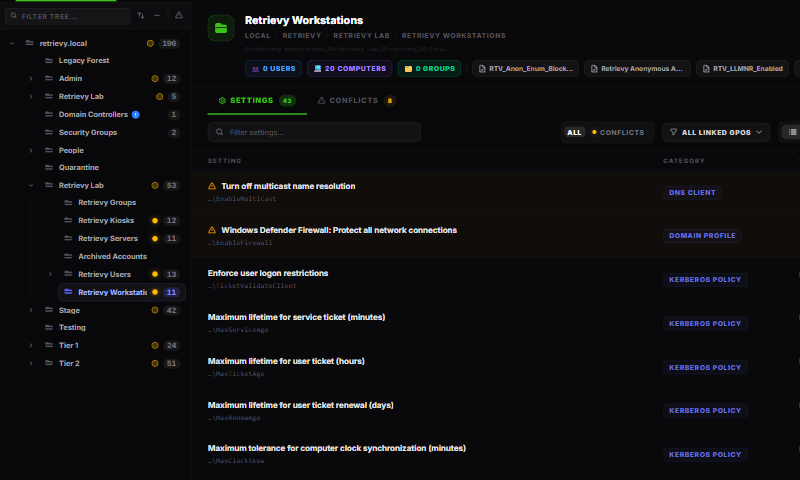
Filter the settings view
The Settings sub-tab includes several ways to reduce a large result:
- Filter settings… searches the setting name, key, value, and policy origin.
- All and Conflicts switch between the full result and settings with competing values.
- All linked GPOs limits the result to a policy linked at the selected OU.
- The view buttons switch between a flat settings list and settings grouped by GPO.
- Sort by system category, alphabetically, policy origin, or conflicts first.
- Include inherited adds settings inherited from parent containers.
Grouped view is useful during policy review because it shows everything a selected GPO writes at that OU. Flat view is better when you are investigating one setting across several policies.
Settings and Conflicts
Use Settings for the resolved result. Each row shows the effective value, winning GPO, source container, and a confidence badge.
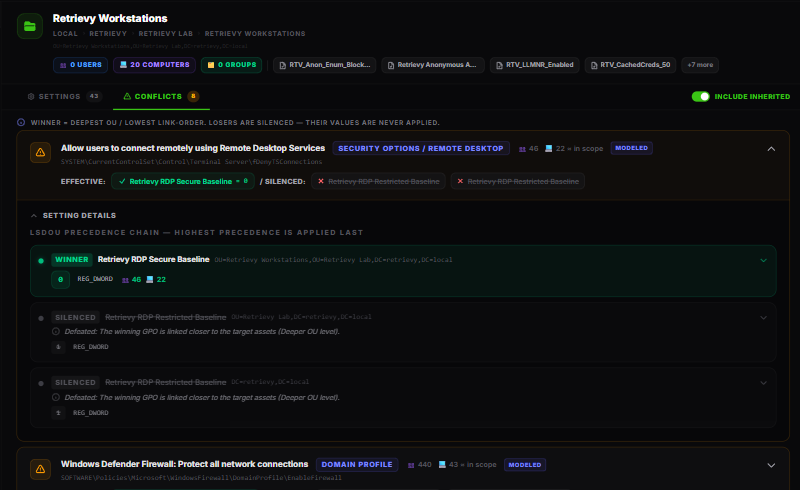
Use Conflicts when two or more applicable GPOs write different values to the same setting. A conflict is not automatically a security failure. It means policy order matters and the lower-precedence values are not effective at this location.
How the winner is modeled
Retrievy evaluates collected links in Local, Site, Domain, and OU order, with child OUs closer to the target taking precedence. It also considers link order, disabled links, Enforced, and Inheritance Blocked.

Expand a setting or conflict to see the contributing GPOs. The effective contributor is marked as the winner; lower-precedence contributors show why they lost. Typical reasons include a closer OU, link order, enforced policy, or blocked inheritance.
This is modeled evidence from the last scan, not endpoint Resultant Set of Policy. A row marked Modeled is deterministic for the collected snapshot, but runtime user, computer, security-filter, WMI, Preferences, and loopback behavior may still change what an endpoint receives.
A safe review sequence
- Select the affected OU and turn on Include inherited.
- Filter for the setting or use Conflicts.
- Expand the row and identify the winner, competing values, and defeat reasons.
- Check confidence and freshness.
- Open the winning and losing policies in GPO Library to review links and recent versions.
- Test the planned change in a controlled OU and verify endpoint policy before broad rollout.
How this affects your Retrievy Index
Conflicts are tracked as Conflicting GPO Setting informational findings. They support triage and lifecycle history but carry zero scoring weight and do not lower the Retrievy Index. Other Active Directory risk findings can affect the score. See the scoring rules catalog.
Troubleshooting
The selected OU shows no settings. Turn on Include inherited, clear the linked-GPO filter, and check whether the GPO partitions or links are disabled.
A GPO you expected is missing. Check the global confidence badge for incomplete SYSVOL, site, security-filter, WMI, Preferences, or loopback collection. Run a fresh scan if needed.
The modeled winner differs from an endpoint. Compare the snapshot time with the endpoint's last policy refresh, then verify security filtering, WMI, loopback, site membership, and Resultant Set of Policy on that endpoint.