Changes
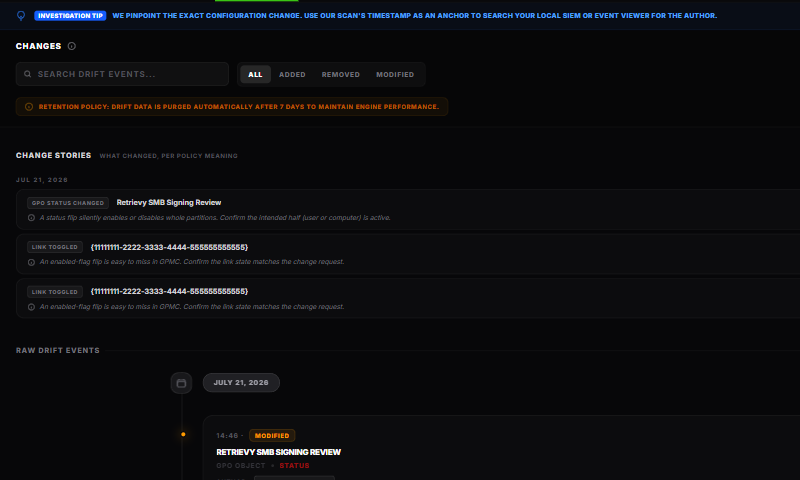
Changes compares successive Group Policy snapshots. It puts meaningful policy change stories first, followed by the raw added, removed, and modified events.
You need at least two compatible scans before differences can appear.
Change stories
Change stories translate related configuration differences into one operator-facing event. Stories can describe:
- a GPO being added, removed, renamed, or enabled or disabled
- a setting being added, removed, or changed
- security filtering, WMI filtering, Preferences targeting, or loopback context changing
- a link being created, removed, enabled, disabled, reordered, or enforced
- block inheritance changing
- the modeled winner, estimated scope, or confidence changing
Use the story-kind filters to focus the timeline. Stories are grouped by day and include the affected entity, time, before and after context where available, and a concrete validation prompt. Select a GPO, OU, site, or setting link to continue in GPO Library or AD Explorer.
Analysis updates
Turn on Analysis updates when you want to see changes caused by collection or analysis improvements. These stories can change a modeled winner, scope estimate, or confidence without an administrator changing the domain.
Treat an analysis update as a prompt to revalidate the latest result. Do not report it as a domain configuration change unless the underlying evidence also changed.
Raw drift events
Below the stories, the raw event list preserves the lower-level comparison:
- Added shows new collected data.
- Removed shows data no longer present.
- Modified shows the previous and updated values.
Use Search drift events... to filter the list. The All, Added, Removed, and Modified buttons limit the event type. Events are grouped by day and retained for seven days.
The collection tells you what changed between snapshots, not who made the change. Use the timestamp as a correlation point for domain-controller audit logs and your change system.
Export the evidence
Select CSV for structured review or PDF Report for a shareable evidence report. Exports reflect the selected domain and available history.
How scan cadence changes the story
The comparison only sees the state captured by each scan. If a value changes and changes back between scans, no difference remains to report. Shorter scan intervals give you a more precise change window.
How this affects your Retrievy Index
Changes and raw drift events are historical evidence. They do not change the Retrievy Index by themselves. If a new scan creates or clears a scored Active Directory finding, that finding can change the score through the normal finding lifecycle. See the scoring rules catalog.
Troubleshooting
No changes appear after the first scan. A baseline has nothing to compare with. Complete a second scan after a configuration change.
A winner or scope story appears with Analysis updates. Collection or analysis improved. Review the new confidence and supporting evidence before attributing it to a domain change.
The expected change is missing. Confirm both scans completed, occurred on either side of the change, and collected the relevant source.