GPO Hygiene
GPO Hygiene groups policies that deserve maintenance review. It does not delete, disable, or edit Active Directory.
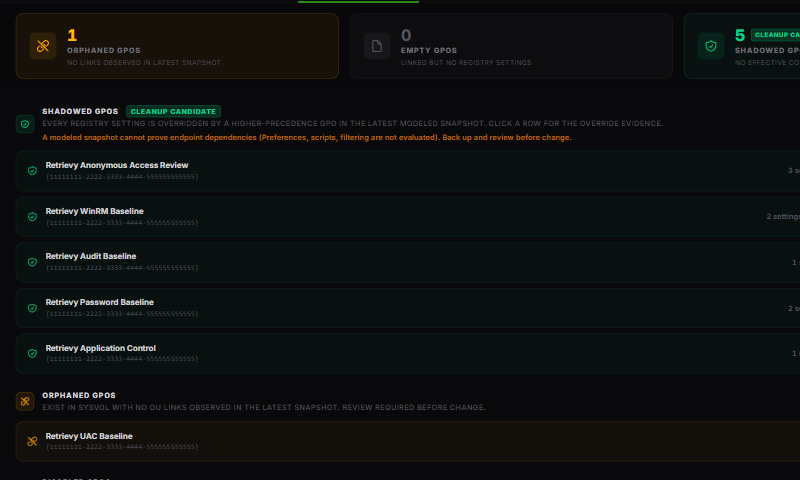
Shadowed GPOs
A shadowed policy has registry settings, but every collected setting is overridden by a higher-precedence GPO in the latest modeled snapshot. It is marked Cleanup candidate and No Modeled Wins.
Expand a row to open Override evidence (modeled). The evidence groups losing settings by the policy that covers them and shows the losing value, winning value, and defeat reason.
This result does not prove the GPO has no endpoint dependency. Preferences, scripts, software deployment, filtering, loopback, stale endpoints, and incomplete collection may sit outside the modeled registry result. Back up and review the policy before changing it.
Orphaned GPOs
An orphaned GPO has no OU link in the latest collected snapshot. Confirm the confidence badge before acting because site links or incomplete collection may change that conclusion. Also review whether the GPO is intentionally staged for later use.
Empty GPOs
An empty GPO is linked but has no collected registry settings. It may still contain non-registry content, including Preferences, scripts, security settings, or software deployment. Inspect the policy in native management tools before removing it.
Disabled GPOs
A disabled GPO has both user and computer settings disabled. Retrievy excludes it from effective-policy analysis while it remains disabled. Keep disabled policies only when they serve a documented rollback, staging, or retention purpose.
Perfect Hygiene
Perfect Hygiene appears when the latest snapshot contains none of the four categories. It means the collected model found no current cleanup observations. It does not certify every endpoint or every GPO extension.
A controlled cleanup workflow
- Open the GPO in GPO Library.
- Check confidence, freshness, links, scope, contribution, and recent changes.
- Back up the GPO and inspect non-registry content.
- Disable or unlink in a controlled scope before deletion when your change process allows it.
- Verify endpoints and monitor for an agreed period.
- Run another scan and confirm the observation clears.
How this affects your Retrievy Index
Empty GPO, Orphaned GPO, and Shadowed GPO are informational findings. They remain available for assignment, resolution, reappearance tracking, and risk acceptance, but carry zero scoring weight and stay out of Active Findings severity totals. See the scoring rules catalog.
Troubleshooting
A policy appears in more than one section. Categories describe different conditions and can overlap. Resolve the trust issue with the highest operational impact first.
A known site-linked policy appears orphaned. Check the confidence reasons. Site collection may be missing or not evaluated in the snapshot.
A cleaned policy remains listed. Run a fresh scan. GPO X-Ray does not query Active Directory live.