Asset criticality
Asset Criticality adds business context to address objects. Policy X-Ray uses the strongest tag among a policy's relevant objects when it calculates that policy's display risk.
The four tiers
| Tier | Use it for | Policy risk multiplier |
|---|---|---|
| Crown jewel | Identity control planes, production databases, signing systems, and other assets whose compromise would be severe. | 1.5 |
| Sensitive | Systems holding confidential data or important internal services. | 1.25 |
| Public | Intentionally internet-facing services. | 1.0 |
| Internal-only | Lower-impact internal systems with no intended public exposure. | 0.8 |
An untagged asset has no criticality adjustment. Final policy risk is capped at 100.

Assign or clear a tag
- In Hygiene & Cleanup > Object Cleanup, select an address object.
- In Global Impact X-Ray, find Asset Criticality.
- Choose Crown jewel, Sensitive, Public, Internal-only, or Untagged.
- Select Save.
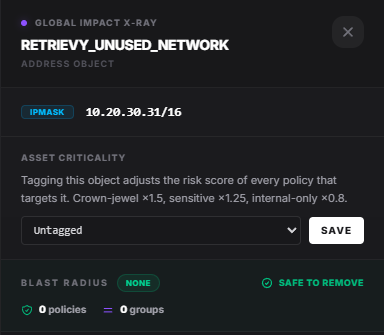
The next render uses the new tag in policy prioritization. If several tagged objects affect one policy, the strongest applicable tier wins rather than multiplying the tiers together.
Choose tags consistently
Document a tenant-wide definition for each tier. Use business impact, data sensitivity, recovery requirements, and intended exposure. Do not tag every production object as a crown jewel; that removes the prioritization signal.
Review tags after application migrations, network redesigns, and decommissioning. A tag belongs to the object name in the selected firewall account, so confirm renamed or recreated objects after the next scan.
How this affects your Retrievy Index
Asset tags adjust the per-policy risk shown inside Policy X-Ray. They do not directly change finding severity or the Retrievy Index. A scored finding associated with the policy still follows the standard finding and module rules. See the scoring rules catalog.
Troubleshooting
The policy order did not change. Another object may have an equal or stronger tag, or the policies may still sort the same after recalculation. Check Risk Score Breakdown.
A tag disappeared after an object rename. Tag the new object name after the next scan.
Everything appears equally critical. Revisit the tier definitions and reserve Crown jewel for the smallest set of highest-impact assets.