The Domino Effect
X-Ray Analysis shows whether a firewall policy has the inspection controls needed for the traffic it permits. It combines policy configuration, profile settings, direction, and asset context into a per-policy risk view.
Choose what to fix first
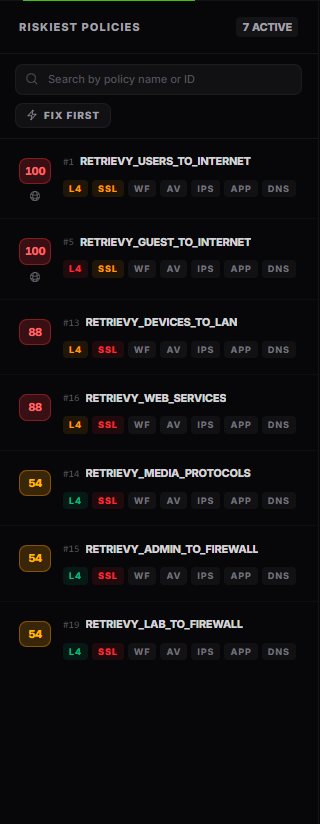
The left pane lists policies with action, direction, services, risk, and compact inspection badges. Select a row to open its pipeline.
By default, policies are ordered by policy risk. Turn on Fix first to reorder them using risk and observed traffic volume. This changes display order only. It does not alter a policy's risk score or the Retrievy Index.
Read the inspection pipeline
The pipeline follows the controls that can inspect or constrain a flow. Select a node to open its configuration evidence and recommendation.
Typical nodes include source and destination scope, service, SSL inspection, application control, web filtering, DNS filtering, antivirus, intrusion prevention, and logging. A node can be healthy, weak, absent, or unable to inspect the flow effectively.
Do not read a green node in isolation. A profile can be attached but still lose visibility because an earlier control is missing or too weak.
The Domino Effect
Encrypted traffic must be decrypted before downstream content controls can inspect its payload. When SSL inspection cannot provide the required visibility, Policy X-Ray marks dependent controls as reduced or blind and highlights the affected path.
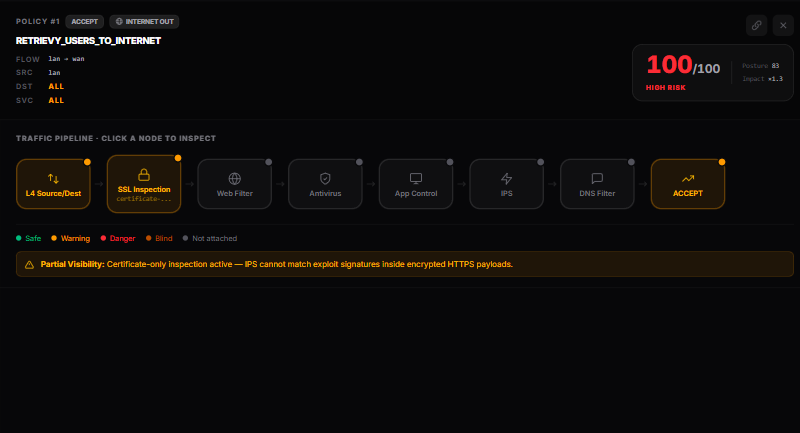

This does not mean every session is malicious or that every attached profile is misconfigured. It means the saved policy cannot give those controls the expected view of encrypted content. Validate certificate deployment, exemptions, inspection mode, application behavior, and performance before changing production inspection.
Policy intelligence detections
Policy X-Ray also highlights risky rule logic that is separate from the Layer-7 pipeline, including:
- accept policies with any source and any destination
- accept policies using ALL services
- disabled or UTM-only traffic logging
- rules proven unreachable behind an earlier rule
- WAN management exposure without a restricted source
- temporary rules whose one-time schedule has expired
These conditions can also appear as scored findings on the FortiGate dashboard. Open the finding for its evidence and remediation status.
Risk score and breakdown
The per-policy risk score ranges from 0 to 100. Open Risk Score Breakdown to separate:
- Posture, which summarizes control gaps in the selected policy
- Impact, which adjusts the result for traffic direction and affected-asset context
- the final capped score
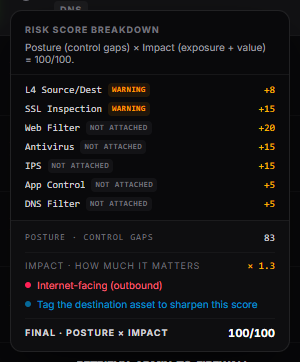
The X-Ray risk score helps prioritize policies within this device. It is not the same value as the Retrievy Index. The Index is calculated from finding severity, state, audit size, and module sensitivity.
Recommendations
Select Recommendations to open Top fixes for this device. Recommendations are grouped across policies so you can address a shared profile or recurring rule pattern once.
Each recommendation can include:
- severity and source
- affected policy count and drill-in
- explanation and validation guidance
- a copyable configuration change when the evidence supports one
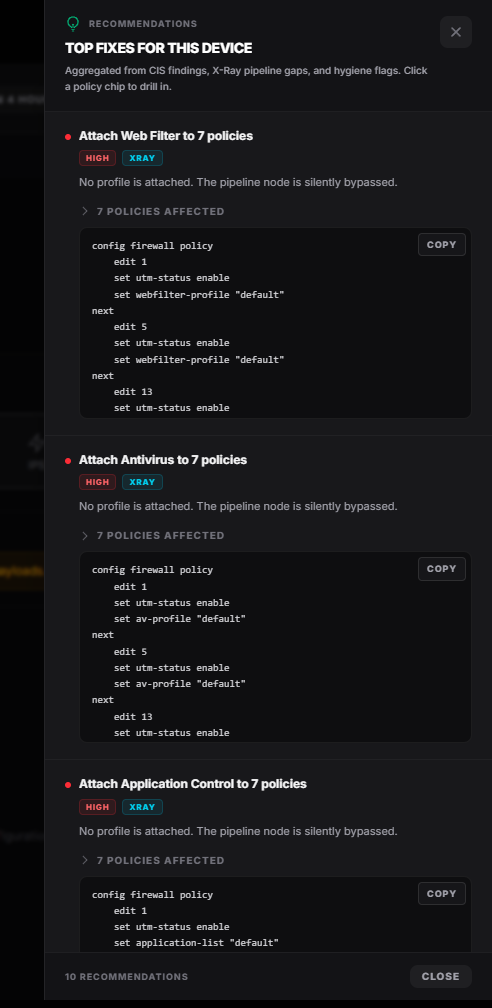
Treat copied configuration as a starting point. Review the selected VDOM, object names, platform version, change window, and rollback plan before applying it.
How this affects your Retrievy Index
Failed FortiGate policy and Layer-7 checks with risk severity contribute to SCM FortiGate Policies, which has a per-module sensitivity of 4.0. The display-only policy risk score and Fix first order do not directly enter the Index. See the scoring rules catalog.
Troubleshooting
A profile is attached but marked weak. Open the node evidence. The profile may be monitor-only, incomplete, or unable to inspect the relevant encrypted traffic.
Fix first order looks different from risk order. Fix first also considers observed traffic volume. Turn it off to return to policy-risk order.
A recent change is missing. Reload after the next completed scan. X-Ray Analysis uses the saved snapshot, not the live device.