Drift history
Drift History compares the selected FortiGate's saved snapshots. It shows what changed and when Retrievy observed the difference.
You need at least two compatible scans. The first scan is marked Baseline.
Read the timeline
Use Search drift events... to find an object, policy, profile, or value. Filter with All, Added, Removed, and Modified.
- Added means the item appears in the newer snapshot.
- Removed means it no longer appears.
- Modified shows the previous and updated values.
Events are grouped by day. Expand an event to compare its values and copy evidence for a review.
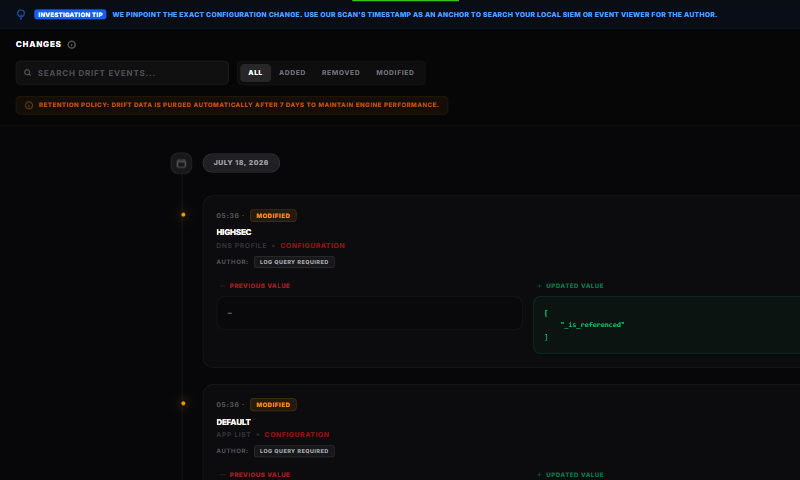
Retrievy records the snapshot comparison time. It does not identify the administrator who made the device change. Correlate the timestamp with FortiGate administrative events, centralized logging, and your change-management record.
Scan cadence matters
Drift compares two captured states. It does not record every command between them. If a setting changes and changes back before the next scan, there is no remaining difference to report.
Run scans often enough to match your change window. After an emergency change, scan once the device reaches its intended state so the next comparison has a reliable checkpoint.
Export
Use CSV for structured analysis or PDF Report for a shareable evidence package. The main Policy X-Ray export menu also offers Schedule delivery when your plan and report permissions allow it.
How this affects your Retrievy Index
Drift events are historical evidence and do not affect the Retrievy Index by themselves. A configuration change can create or clear a separate scored finding on the next scan. See the scoring rules catalog.
Troubleshooting
The timeline is empty. Confirm a second scan completed after the baseline and that a collected value changed.
A known change is missing. Confirm the scans occurred on opposite sides of the change and that the affected configuration was included in both snapshots.
The author is not shown. Use the event timestamp to search FortiGate and change-management logs. Snapshot comparison does not collect author identity.