Hygiene and cleanup
Hygiene & Cleanup separates rule review from object cleanup. It is read-only and does not change the firewall.
The two sub-tabs
- Rule Optimization finds policy-level cleanup candidates and order-dependent anomalies.
- Object Cleanup finds address and service objects that are unused or duplicated.
The count on each sub-tab reflects the issues currently shown. Within Rule Optimization, choose Action Board for grouped investigation or Classic Matrix for a policy table.
Rule Optimization
The Action Board can show:
| Group | What it means | Evidence source |
|---|---|---|
| Zombie Rules | Telemetry confirms zero hits for the collected observation window. | Device telemetry |
| Stale Rules | The last observed use is older than the configured inactivity threshold. | Device telemetry |
| Empty Address Objects | A policy references an address or service group with no members. | Saved configuration |
| Expired Rules | A policy uses a one-time schedule whose end time has passed. | Saved configuration |
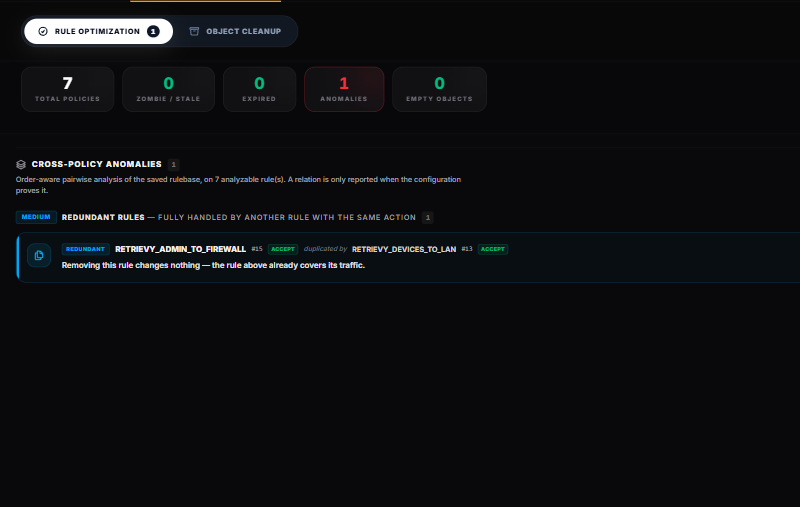
Zero hits and stale use do not prove a rule is unnecessary. A seasonal process, failover path, partner flow, or incomplete telemetry window may explain the result. Disable and monitor before deletion when your change policy permits it.
An expired temporary rule is different. Its schedule can no longer become active, so the rule is dead while that expired one-time schedule remains attached. Review the intended expiry, then remove or replace the rule through your normal change process.
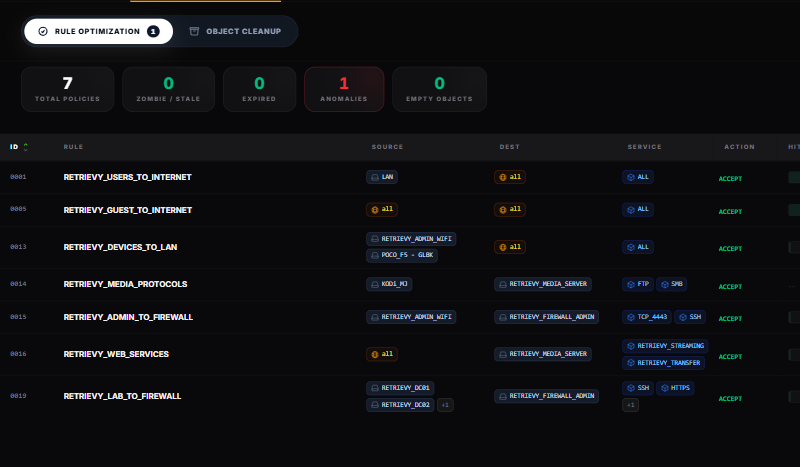
Classic Matrix shows policy ID, rule, source, destination, service, action, hits, last seen, and flags in one table. Use it to compare neighboring rules and confirm the order before acting.
Cross-Policy Anomalies
Cross-Policy Anomalies compares enabled rules in top-down order. It reports only relationships the saved configuration can prove:
- Shadowed Rules: an earlier opposite-action rule covers every flow the later rule could match, making the later rule unreachable.
- Correlated Rules: opposite-action rules overlap partially, so order decides part of the traffic.
- Redundant Rules: another same-action rule already handles the complete match space.
- Generalizations: a specific exception appears before a broader rule. This is often intentional but should be documented.
- Merge Candidates: same-action rules are identical except for one match dimension and may be candidates for consolidation.
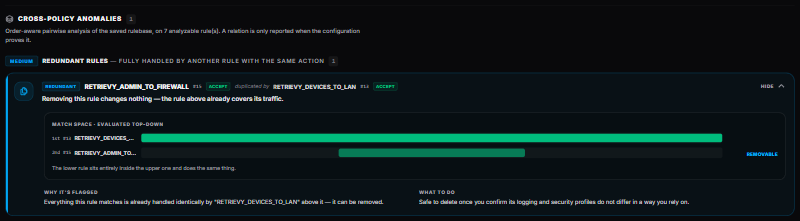
Expand an item to see the top-down match-space comparison, why it was flagged, and what to review. The group badge shows the worst severity among its items.
The engine excludes rules it cannot compare safely, including unresolved objects and rules that depend on FQDN, internet service definitions, identity, device or ZTNA conditions, or negation. An exclusions panel shows how many rules were omitted and why. No reachability claim is made about excluded rules.
Zones and their member interfaces are treated as equivalent for this comparison.
Object Cleanup
Object Cleanup has two panels:
- Unused Objects lists address and service objects not referenced by a collected policy or group.
- Duplicate Objects groups different names that resolve to the same collected value and suggests a canonical name to review.
Select an object to open Global Impact X-Ray. The drawer shows:
- asset criticality
- Blast Radius based on collected policy and group references
- direct and indirect Group Memberships
- Affected Policies
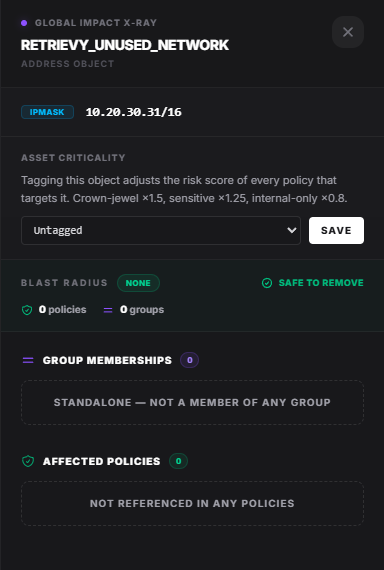
Blast Radius levels are based on the number of collected references: none, low, medium, or high. Safe to remove means no policy or group reference was found in the collected snapshot. It is not a guarantee that no external process, automation, unpublished configuration, or newer device state depends on the object.
Before removing or consolidating an object:
- Run a fresh scan.
- Open Global Impact X-Ray and review every group and policy reference.
- Search automation, templates, change records, and other VDOMs or devices for the object name.
- Replace references before deleting a duplicate.
- Back up the configuration and use a rollback plan.
- Scan again to confirm the observation clears.
How this affects your Retrievy Index
The score depends on the finding type:
- Risky policy detections such as an expired temporary rule or a proven unreachable shadowed rule can be Medium or higher and affect SCM FortiGate Policies.
- Telemetry cleanup observations such as stale or zero-hit rules and unused objects are informational and carry zero weight.
- An anomaly shown for investigation does not change the Index unless a corresponding scored finding exists.
See the scoring rules catalog.
Troubleshooting
Zombie Rules is empty. The device may not have returned usable hit telemetry. Configuration-only sections can still appear.
A suspected shadow is not reported. Open the exclusions panel. Dynamic or unresolved match conditions are intentionally omitted when reachability cannot be proven.
An object marked Safe to remove is known to an external script. The label reflects collected firewall references only. Treat external automation as an additional dependency.