Policy Simulator
Policy Simulator estimates which policy would handle a proposed IPv4 flow. It reads the saved snapshot only. It does not send traffic or change the firewall.
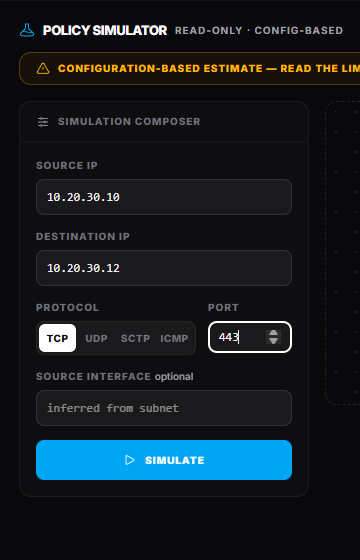
Compose a flow
Enter:
- Source IP, required IPv4
- Destination IP, required IPv4
- Protocol, one of TCP, UDP, SCTP, or ICMP
- Port, required except for ICMP
- Source interface, optional; Retrievy can infer it from a connected subnet
- VDOM, when the device has more than one
Select Simulate. The result reflects the selected device's latest snapshot.
Read the verdict
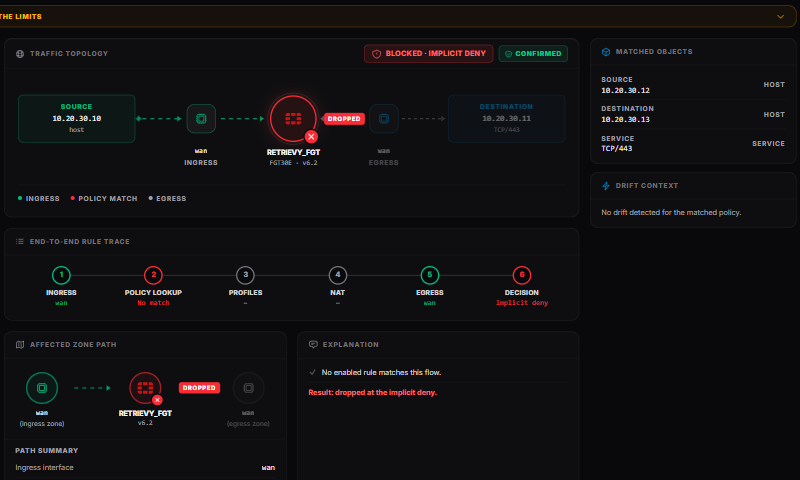
The result begins with one of four verdicts:
- Permitted
- Blocked · explicit deny
- Blocked · implicit deny
- Cannot evaluate
A permitted or blocked result is also marked Confirmed or Uncertain. Confirmed means the collected configuration was sufficient for the modeled decision. Uncertain means a plausible path or match depends on information the snapshot cannot determine.
Cannot evaluate means the simulator cannot make a responsible decision for this flow. It does not mean the firewall will block it.
Follow the trace
The result can include:
- Matched rule and a link to X-Ray Analysis
- Traffic topology and Affected zone path
- Path summary with ingress interface, egress interface, next hop, and return path
- End-to-end rule trace through Ingress, Policy lookup, Profiles, NAT, Egress, and Decision
- Explanation and Why this verdict is uncertain
- Fall-through cascade, showing which later confirmed rules could take the flow if earlier matches were removed
- Could also apply · not certain from config, for plausible rules the snapshot cannot prove
- recommendations, matched objects, policy hygiene, drift context, and related context
Policy IDs in the cascade and uncertain-match list are links. Use them to compare the relevant rules in X-Ray Analysis.
What the simulator models
The simulator evaluates enabled IPv4 policies in top-down, first-match order. It expands collected address and service objects and groups, applies address and service negation, and treats zones and member interfaces as equivalent.
For path selection it can:
- infer ingress from connected subnets when no source interface is supplied
- use connected and collected static routes for egress
- stop on a selected blackhole route before policy evaluation
- skip expired or future one-time schedules
- evaluate recurring schedules where the collected window is sufficient
A recurring or timezone-sensitive schedule can make the result Uncertain. Confirm the device time and schedule before a change.
Limits that reduce confidence
Configuration alone cannot reliably resolve every FortiGate decision. Expect uncertainty or Cannot evaluate for flows that depend on:
- authenticated users, groups, or identity services
- device identity or ZTNA tags
- internet service definitions, FQDN, geography, or other dynamic addresses
- traffic to the FortiGate itself
- destination translation, central NAT, policy-based NGFW, or IPv6
- dynamic routing, SD-WAN, policy routes, or equal-cost paths not represented by the snapshot
Return-path information is advisory and may be incomplete when routing is asymmetric or dynamic.
Use a simulation before a rule change
- Simulate a representative flow and record the verdict and confidence.
- Open the matched rule in X-Ray Analysis.
- Review the Fall-through cascade before reordering or deleting a rule.
- Run additional flows for important sources, destinations, protocols, and schedules.
- Apply the change through your normal firewall process.
- Validate on the device, then scan again and repeat the simulation.
How this affects your Retrievy Index
Simulation verdicts are decision support and do not affect the Retrievy Index. The matched policy may have separate scored findings. See the scoring rules catalog.
Troubleshooting
The source interface is uncertain. Select it explicitly. Subnet inference can be ambiguous when networks overlap.
A recurring schedule makes the result uncertain. Confirm the FortiGate timezone and current schedule window on the device.
The route differs from the live firewall. The simulator uses connected and collected static routes. Dynamic routing, SD-WAN, and policy routes may choose a different live path.