Identity X-Ray overview
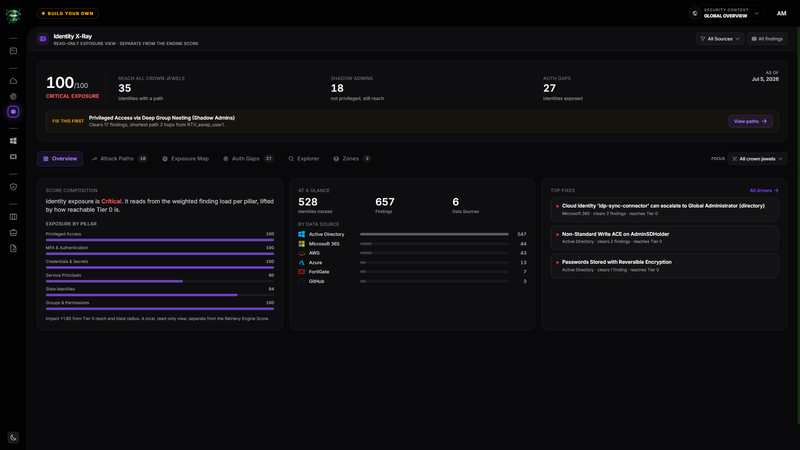
Identity X-Ray brings identity findings, privilege paths, authentication gaps, and sensitive target groups into one investigation workspace. It is a read-only analysis view, apart from the Zones tab where you define the crown jewels you want Retrievy to monitor.
Before you start
- Your plan includes Identity Security Posture Management (ISPM).
- Your role can view all ISPM findings or the ISPM findings for assigned accounts.
- At least one Data Source has completed a scan with identity findings.
Open Identity X-Ray
- Open Identity (ISPM) in the navigation.
- Select Identity X-Ray from the nested navigation.
- Leave All Sources selected for a workspace-wide view, or choose one Data Source.
Select All findings in the header whenever you need the full ISPM findings list.
Read the exposure summary
The summary stays visible across all six tabs:
| Summary item | What it tells you |
|---|---|
| Exposure score | A local 0 to 100 measure where a higher number means more identity exposure. The label reads Low, Moderate, High, or Critical exposure. |
| Reach All crown jewels | Identities with a detected relationship path to built-in Tier 0 targets or one of your Privileged Zones. |
| Shadow Admins | Identities that are not nominally privileged but still have a detected path to a crown jewel. |
| Auth Gaps | Distinct identities with a missing MFA control, weak or legacy authentication, or a weak password policy. |
| As of | The date used for the current analysis. |
| Fix this first | The exposure driver that clears the most findings first, with preference given to issues that open a path to a crown jewel. |
Select Reach All crown jewels, Shadow Admins, Auth Gaps, or View paths to move directly to the relevant investigation.
Use the Overview tab
The Overview tab answers three questions:
- Score composition shows exposure across Privileged Access, MFA & Authentication, Credentials & Secrets, Service Principals, Stale Identities, and Groups & Permissions.
- At a glance counts tracked identities, findings, and Data Sources. Select a Data Source row to scope the entire workspace to it.
- Top fixes lists the next three exposure drivers after Fix this first. Select All drivers to open the Drivers view under Explorer.
The exposure score is separate from your Retrievy Index. It combines the concentration and severity of active identity findings with the reach and blast radius shown by collected relationship evidence.
Choose a view
| Tab | Use it to |
|---|---|
| Overview | Read the exposure score, source distribution, and top fixes. |
| Attack Paths | Group detected paths by shared chokepoint and find the change that collapses the most paths. |
| Exposure Map | Trace identities from Data Sources through shared chokepoints to crown jewels. |
| Auth Gaps | Compare missing MFA, weak authentication, and weak password-policy exposure by Data Source. |
| Explorer | Review exposure drivers, people, privileged identities, or the complete identity inventory. |
| Zones | Define and monitor your own crown-jewel groups and accounts alongside built-in Tier 0. |
Scope the workspace
Use All Sources in the header to include every Data Source with identity findings. Choose a source to recalculate the summary and every open tab for that source.
If you have custom Privileged Zones, use Focus to choose All crown jewels, Tier 0, or one named zone. All crown jewels combines built-in Tier 0 with every zone you defined. The selected focus applies to the summary, paths, map, and privileged inventory.
How this affects your Retrievy Index
Opening Identity X-Ray, changing a filter, or changing Focus does not change your Retrievy Index. The local exposure score is an investigation aid and does not feed the Index.
The underlying identity findings still contribute to the ISPM module score according to their severity and state. Fixing a finding and collecting new evidence can change the Index. See the scoring rules catalog.
Troubleshooting
Symptom: Identity X-Ray does not appear below Identity (ISPM).
Fix: Confirm your plan includes ISPM and your role can view ISPM findings.
Symptom: The page shows No identity data yet.
Fix: Connect an identity-bearing Data Source, complete a scan, then return to Identity X-Ray.
Symptom: Counts change after choosing a Data Source or focus.
Fix: Clear the source filter back to All Sources and set Focus to All crown jewels for the complete view.