Identity attack paths
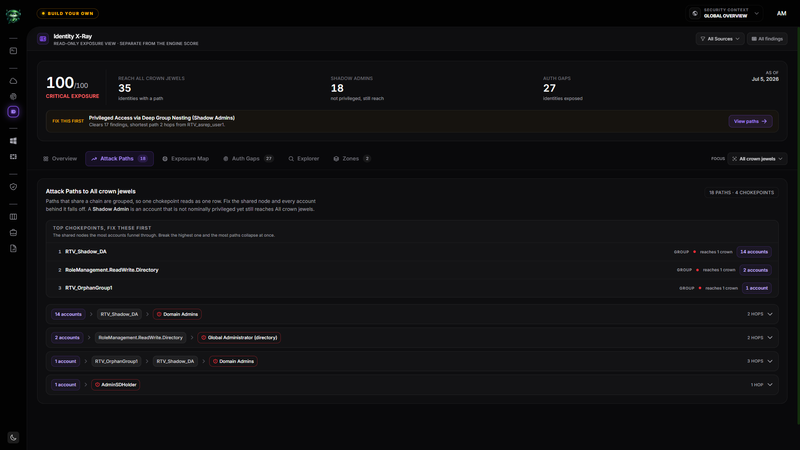
The Attack Paths tab shows which identities can reach the selected crown jewels and the relationships that make each route possible. It groups paths with the same chain so you can address a shared chokepoint once instead of treating every exposed identity separately.
Before you start
- Complete the prerequisites in the Identity X-Ray overview.
- Keep Focus on All crown jewels for a complete view, or select the target set you want to investigate.
- Collect relationship evidence from Active Directory or from an entitlement-enabled Microsoft Entra or Azure Data Source.
Read the path summary
Open Attack Paths. The count in the tab and the summary at the top of the panel show:
- The number of detected paths in the current Data Source and crown-jewel scope.
- The number of shared chokepoints across those paths.
A Shadow Admin is an identity that is not nominally privileged but still reaches the selected crown jewel through a detected relationship.
Start with the top chokepoints
Top chokepoints, fix these first ranks the shared nodes that the most identities pass through. Each row shows the relationship name, the number of crown jewels it reaches, and the number of accounts behind it.
Start with the highest-ranked row when one access change can remove several detected paths. Confirm the business purpose and downstream access before changing a group, role, or entitlement.
Identity X-Ray does not change directory memberships or cloud entitlements. Apply the correction in the source system, then run a new scan to verify that the path disappeared.
Expand a grouped path
Each grouped row reads from left to right:
- The number of accounts that share the route.
- One or more intermediate groups, roles, or entitlements.
- The destination crown jewel.
- The number of hops in the route.
Select a row to list every account behind that chokepoint. Select an account to open its identity detail drawer.
Inspect an identity
The identity detail drawer can show:
- Path to Tier 0, which is the shortest detected route used on the map.
- All Detected Paths, which keeps additional routes visible even when the identity already has a shorter or direct route.
- Risk Markers, findings, and the reason each finding matters.
- Blast Radius, when relationship evidence supports the calculation.
Removing one displayed route does not prove the identity has no other route. Review All Detected Paths, apply the source-side change, and verify with fresh evidence.
Understand an empty result
The message No privilege path is mapped in this scope means Retrievy has no detected path for the current source and focus. It does not prove that no path exists outside the collected evidence.
Active Directory and entitlement-enabled Microsoft Entra or Azure sources can supply relationship evidence. Other Data Sources still contribute identity inventory and findings, but they do not produce a path without that evidence.
How this affects your Retrievy Index
The path count and chokepoint ranking do not feed your Retrievy Index. They help you prioritize the identity findings that do.
After you correct the relationship in the source system and a new scan verifies the result, related findings can leave the active finding set. The ISPM module score then reflects their new state according to the scoring rules catalog.
Troubleshooting
Symptom: An identity appears in Explorer but not in Attack Paths.
Fix: The identity has findings but no detected relationship path to the selected crown jewels. Clear the Data Source filter and set Focus to All crown jewels before checking again.
Symptom: A path still appears after you changed a membership or entitlement.
Fix: Complete a new scan for that Data Source. Identity X-Ray reads the most recent collected evidence, not the live directory.
Symptom: A direct administrator has more routes than the grouped row suggests.
Fix: Open the identity and review All Detected Paths. The primary view emphasizes the shortest route while the drawer retains the additional detected routes.