Authentication exposure
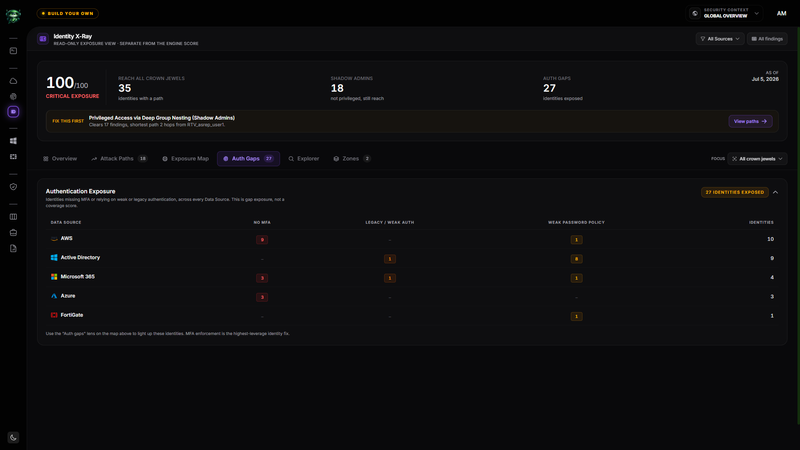
The Auth Gaps tab groups authentication weaknesses by Data Source. It counts exposed identities, so you can find the source and control category with the largest remediation opportunity.
Before you start
- Complete the prerequisites in the Identity X-Ray overview.
- Leave All Sources selected to compare every identity-bearing Data Source.
- Confirm the relevant Data Sources completed a recent scan.
Read the Authentication Exposure table
Open Auth Gaps. The badge at the top shows the number of distinct identities with at least one detected authentication gap in the current scope.
| Column | What it counts |
|---|---|
| No MFA | Identities associated with a finding for missing or unenforced multifactor authentication. |
| Legacy / Weak Auth | Identities associated with legacy protocols, weak encryption, or another weak authentication mechanism. |
| Weak Password Policy | Identities associated with weak password requirements, password lifetime, complexity, or lockout settings. |
| Identities | Distinct exposed identities for that Data Source, without double-counting an identity that has more than one gap type. |
A dash means no matching gap was detected for that source and category.
Treat the values as exposure counts
The table is not an MFA coverage percentage. Retrievy receives evidence about detected gaps, but a scan may not provide the complete identity population needed for a coverage denominator.
Use the counts to prioritize remediation and compare Data Sources. Use the source system when you need an authoritative enrollment or coverage percentage.
Narrow the investigation
Select a Data Source name in the table to scope all Identity X-Ray tabs to that source. Return to All Sources in the header to restore the comparison.
Open Exposure Map and select the Auth gaps lens to isolate path-bearing identities that also have an authentication weakness. Use Explorer to review all identities with findings, including identities that have no detected privilege path.
Understand the clean state
If the current scope has no matching authentication findings, the panel shows No authentication gaps in this scope. This means no gap was detected in the collected evidence. It does not replace verification in the source system.
How this affects your Retrievy Index
The counts in Authentication Exposure do not feed your Retrievy Index as a separate calculation. The underlying findings contribute through the normal ISPM severity and state rules.
After you enforce MFA or correct an authentication control, run a new scan. Verified findings can then stop contributing according to the scoring rules catalog.
Troubleshooting
Symptom: The table count is lower than the number of findings on the ISPM dashboard.
Fix: The table counts distinct identities with authentication gaps. One identity can have several findings, and non-authentication findings do not appear here.
Symptom: A source is missing from the table.
Fix: That source has no detected authentication-gap findings in the current scope. Clear the Data Source filter and confirm its latest scan completed.
Symptom: You fixed MFA, but the identity remains exposed.
Fix: Run a new scan and check whether another authentication finding still applies to the same identity.